Nvidia App adds 'Auto Shader Compilation' for faster load times in games — beta feature automatically recompiles shaders in the background after every driver update
⚡ Quick Hits
- Say Goodbye to Stutter: Prevents the annoying first-launch stuttering associated with on-the-fly shader building.
- Background Processing: Automatically recompiles shaders silently after you install a new GPU driver.
- Faster Game Launches: Significantly reduces load times so you can get right into the action.
Greetings from The Tech Monk. If you are a PC gamer, you likely know the pain of updating your graphics drivers only to be greeted by a five-minute "Compiling Shaders" loading screen the next time you launch your favorite game. Fortunately, Nvidia is finally addressing this major friction point.
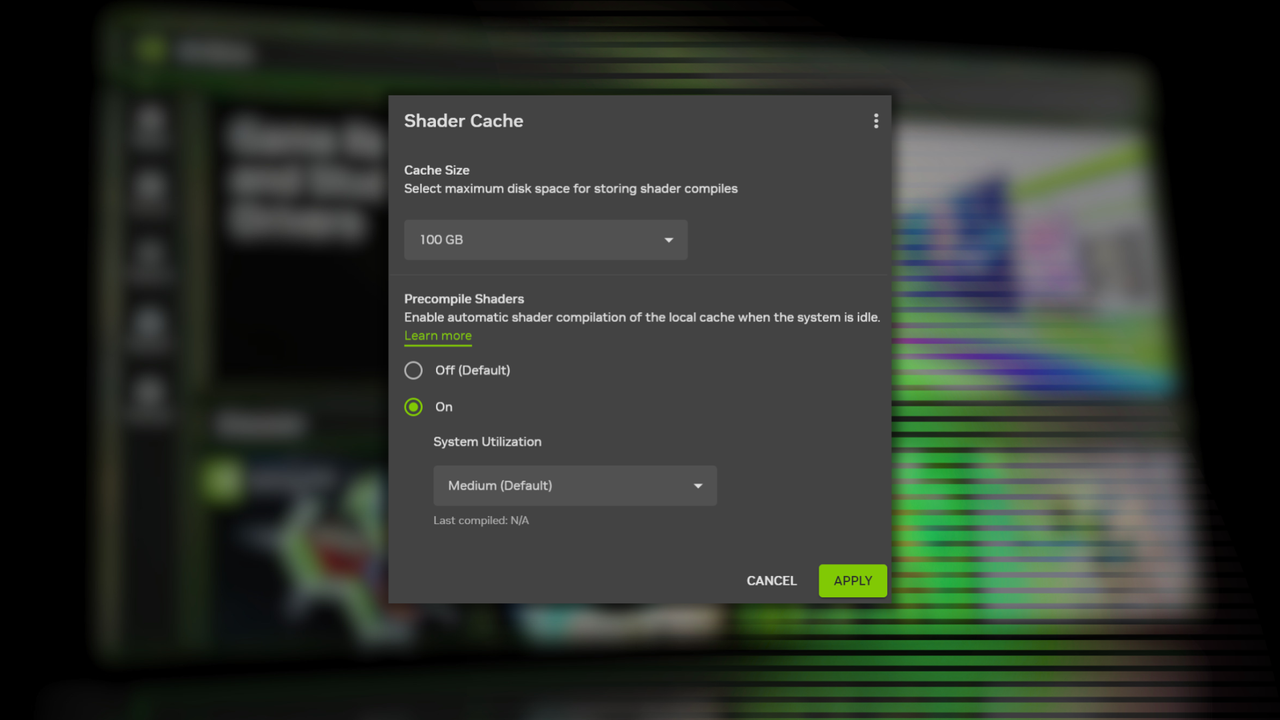
Nvidia has quietly rolled out a brilliant quality-of-life update to the Nvidia App: a beta feature known as Auto Shader Compilation.
Instead of forcing your system to crunch through shader processing while you sit at the main menu, this feature intelligently utilizes your system's downtime. The moment you finish installing a fresh graphics driver, the app goes to work in the background, automatically recompiling the necessary shaders for your games.
Why This Matters
Shader compilation stutter has been a persistent issue in modern PC ports. By shifting this workload to the background before you even click "Play," you get a substantially smoother initial gameplay experience and drastically shorter load times. It’s a seamless upgrade that continues to make the new Nvidia App a worthy, lightweight successor to the aging GeForce Experience.
Make sure to opt into the beta features within your Nvidia App settings to take advantage of this massive time-saver!